Adding accounts (Commercial)
Manage which accounts are available in your commercial online banking contract. Add new accounts as your memberships grow and designate up to 10 main accounts for quick access.
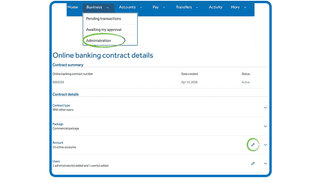
This feature is available to administrators only. You will only see the Administration menu item if you have been designated as an administrator on your contract.
Here's how to add accounts to your contract:
Here’s how to add or remove accounts on your contract:
- Select Business from the top menu bar, then choose Administration from the dropdown.
- From the Online Banking Contract dashboard, select the arrow to open the contract details.
- Select the pencil icon on the Accounts feature to edit.
- Expand each membership to view active accounts. To add an account, check the individual account checkbox on the left to mark it active, or check Active for this contract to enable all accounts for that membership.
- To add a newly opened account not yet listed, select Add available account, expand the membership, and select the account.
- Optionally check Set as main to designate frequently used accounts. Up to 10 main accounts can be selected — at least one must be a Canadian chequing or savings account.
- To remove an account, uncheck the account checkbox or uncheck Active for this contract for the full membership. At least one account must remain active.
- Select Save, then Continue and Refresh to apply the contract changes.
About main accounts
Main accounts appear first in the Accounts Summary listing and on the Home dashboard. A limit of 10 main accounts can be selected. Removing an account automatically removes it as a main account.
If users are logged in when contract changes are made, they will receive an error and be required to sign out and back in.
More admin
Creating permission groups (Commercial)
Permission groups control how users access accounts, perform transactions, and approve activity. Set up groups that match your organization’s structure and access requirements.

Adding limits (Commercial)
Cap dollar values or transaction counts per permission group. Get step-by-step instructions to add a limit and manage spending thresholds across your contract.

We're here for you every step of the way.
Check out our support centre for step-by-step instructions on new and returning features.
- Schedule a call
Send us an email
Email us and we’ll respond within one business day.
Phone:
Give us a call at 1.877.378.8728 to speak with someone right away.